Really, this doesn’t only apply to your designer, but to anybody other than the developers coding the game. Let me explain the problem we had in RambukGames and how we solved it.

[more]
We are two developers and one designer doing a Windows Phone 7 game in XNA. The developers can of course try the game all the time in the emulator that VS2010 deploys the game to, the designer is more tricky. Our designer of course needed to be able to try out the game from time to time, but he doesn’t know anything about “getting latest” from source control or building the code in VS2010.
So what do we do?
With the Windows Phone 7 tools there is an tool called “Application Deployment” that can take a .xap file and deploy it to either a real device or to the emulator. That tool seemed to be the solution to our problem.

So we made our designer install the Windows Phone 7 tools from here.
http://www.silverlight.net/getstarted/devices/windows-phone/
After this, we send him the latest build of the game as a .xap file. He used the tool to deploy it, but nothing happened. Why? The game didn’t start by itself and he couldn’t find it in the apps list, so where was it?
This happens because an XNA GAME on the Windows Phone 7 is put into the “Games Hub” or what ever they call it. This is all good, as the user of the phone then have all his/her games in one single place.
The bad thing is that this hub is removed from the emulator, which makes for you to find your game.
So, what to do with this? Well, we can’t get the “Games Hub” to show up in the emulator, so we need our game to go into the apps list, at least as long as it’s under development.
You do this by altering your “WMAppManifest.xml” in your XNA game project.
Then you need find the text below:
Genre="Apps.Normal"
Then alter it to:
Genre="Apps"
Now, when you build your XNA game for Windows Phone 7, it will show up in the apps list (you know over to the right from the mainscreen)
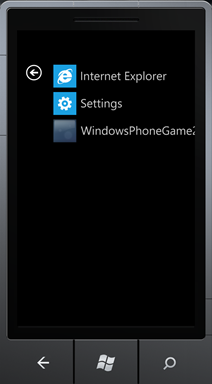
This way your designer, or someone else, can try your game in the emulator with out having to have the source code and build it them self. This is pretty smart, but it would be even more nice if Microsoft haven’t removed the “Games Hub” from the emulator 
A little reminder, I think it might be a good idea to undo this change to the “WMAppManifest.xml” file before submitting your game to the marketplace.
– Enjoy!